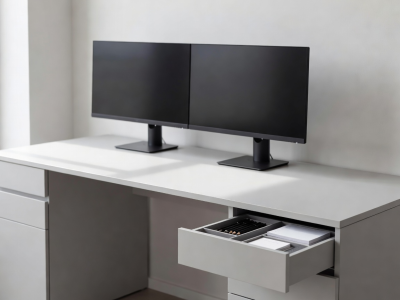
Designing for Maximum Focus
A home office must function as a machine for productivity. Visual clutter—piles of unsorted mail, tangled cables, and random office supplies—acts as cognitive friction. The brain expends background energy processing items in its peripheral vision. To maintain deep focus, the physical environment must be rigorously stripped down and structured.
The Clear Desk Protocol
The primary workspace is sacred. The surface of your desk should only house objects necessary for the immediate task at hand. The baseline setup involves a monitor, keyboard, mouse, and a single notebook or task pad. Everything else—pens, staplers, charging cables, extra paper—must be relegated to peripheral storage zones.
At the end of every workday, enforce a strict "reset to zero" protocol. Wipe the desk clear. This ensures you start the following day with a blank slate, entirely free from the residual mess of yesterday's tasks.
Cable Management: Invisible Infrastructure
Dangling wires instantly degrade the aesthetic and psychological order of a workspace. Proper cable management transforms a chaotic desk into a structured command center.
- Under-Desk Trays: Mount heavy wire trays to the underside of the desk surface to hold power strips and excess cable lengths.
- Cable Sleeves and Zip Ties: Group cables traveling to the same destination (e.g., monitor to PC) in braided neoprene sleeves or velcro ties.
- Grommets: If feasible, route cables directly through a hole drilled into the desk rather than draping them over the back edge.
Paper Management and Filing
Despite living in a digital age, paper remains a stubborn physical reality. Without a system, paper stacks laterally, consuming desk space. Implement a vertical processing system.
| Category | Action Required | Storage Method |
|---|---|---|
| Inbound / Action | Needs immediate attention (bills to pay, forms to sign) | Vertical desktop sorter or single designated inbox tray |
| Reference / Archive | Kept for legal or historical reasons (tax documents, contracts) | Filing cabinet with hanging folders, stored out of sight |
| Digitize / Destroy | Information needed, but physical paper is not | Scan immediately to cloud, then shred |
Digitization Strategies
To fundamentally solve the paper problem, stem the inflow. Switch all banking, utilities, and services to paperless billing. For inbound physical mail, keep a shredder and recycling bin immediately adjacent to the desk. Process mail the moment it enters the room: recycle the junk, shred the sensitive, and place action items in the vertical sorter.
Ergonomic Zoning
Position resources based on biometric reach. Primary tools (keyboard, mouse) sit within the "primary reach zone"—areas accessible with elbows resting at your sides. Secondary tools (notebook, phone) belong in the "secondary reach zone"—accessible by extending the arm without leaning. Filing cabinets, printers, and reference books belong in the "tertiary zone"—requiring standing or rolling a chair to access. This prevents the desk surface from accumulating items that are rarely touched.